


Meme Cute Beats
4.615.00 Reviews
App Specs
- Version
- 0.0.38
- Updated On
- License
- Free
- Downloads
- 1,000,000+
- Developer
- VGP Studio
- Categories
- Music
- Platform
- Android
Screenshots
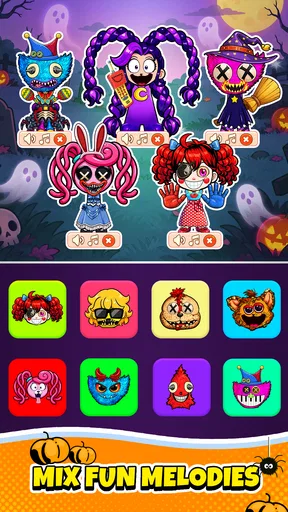
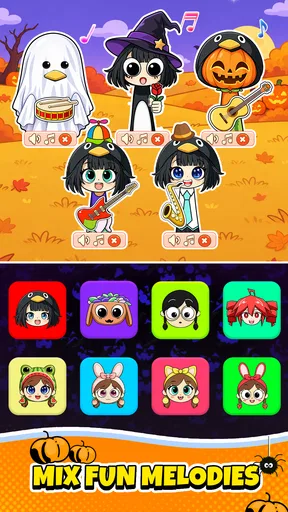
 Analysis by AppCompare
I judge a music game by what happens after the first burst of novelty: does it invite a second experiment, and can I make something enjoyable without treating it like a serious production task? Meme Cute Beats is built for quick, playful beat-making, pairing expressive characters with sound choices that are meant to be tried rather than studied. I find it most rewarding when I approach it as a small creative break, not as a substitute for a full music workstation.
A low-pressure way to start making a beat
The best first session is simple: listen to the available sounds, pick a character whose part you enjoy, then add one or two more layers and hear how they sit together. That gives me a feel for the game’s comic, cute style before I try to make a polished loop. Its appeal is the quick feedback between choosing sounds and seeing characters react, which makes experimentation approachable even if I have no musical training.
I also recommend changing only one thing at a time. If a mix feels crowded, remove a layer before adding another; if it feels flat, try a different combination or tempo. This small habit makes it easier to hear what each choice contributes and helps avoid the common trap of piling on every amusing sound at once. The goal is not technical perfection but a beat with a clear personality.
Who will enjoy the playful format
This works especially well for people who want a casual music game they can dip into between other tasks. A short session while waiting for a ride or taking a lunch break can be enough to build a silly rhythm and enjoy the animated response. It can also be a friendly starting point for younger players interested in how sounds combine, though the game’s content rating is Teen, so families should consider that when deciding whether it suits a particular player.
For a realistic everyday use, I would open it during a quiet break, make a few versions of a loop, and keep the one that makes me laugh or catches my ear. Sharing a creation can turn that into a light conversation with friends, rather than a project that needs a long setup or specialist knowledge. I would not use it when I need a clean, professional backing track or exact control over a finished song; the fun here comes from playful combinations, not studio-level editing.
Where it sits among music games
Compared with rhythm games that ask you to follow prompts or hit notes on time, this one puts more emphasis on arranging sounds and enjoying the result. Compared with full music-making software, it is intentionally less demanding: I can focus on character-led ideas instead of learning a deep set of production tools. That trade-off is the point. It is easier to pick up for a quick laugh, but it is not the choice I would make for detailed mixing, exporting a carefully mastered track, or building a conventional song arrangement.
That distinction also helps set expectations about replay. I return when I want to test a funny pairing or find a combination that feels unexpectedly catchy. If I want a strict score challenge, a broad instrument library, or a more serious composing workflow, another kind of music app will suit me better. The game’s identity is its light, visual experimentation, so it is strongest when I let it stay playful.
Worth Reading Before You Choose

Flipboard Shows What News Apps Must Do Beyond the Feed

Switching to Android Auto Means Rethinking Your Driving Routine

Google Calendar Makes a Crowded Week Easier to Manage

Ludo King Makes the Most of the Minutes Between Plans

Baby Panda World Brings Quick Play to Modern Phones, but Its Game Library Feels Busy

ESPN’s Live Game View Makes Following Close Games Easier
Getting to Know Meme Cute Beats
First things first, let’s talk about what Meme Cute Beats actually is. It’s a quirky app available on both Android and iOS that allows you to create music using a variety of cute and funny characters. You know those moments when you’re bored and need a little pick-me-up? This app is perfect for that! It’s all about mixing beats with meme-worthy animations to create something truly unique.
The Interface: Simple Yet Engaging
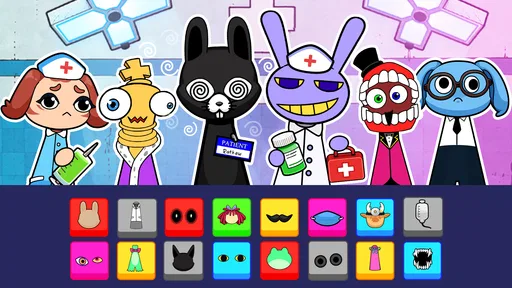
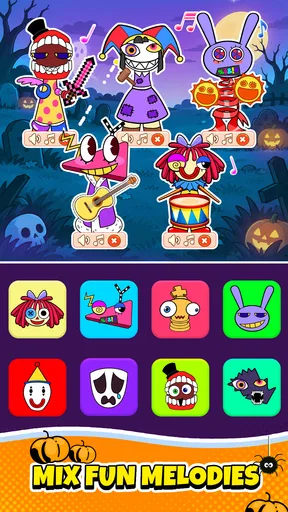
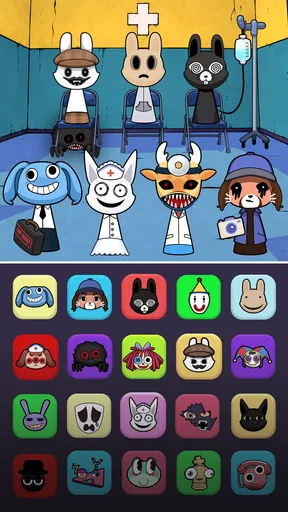
The interface is as straightforward as it gets, which is great because who has time to read through long tutorials? Upon launching the app, you’re greeted with a colorful screen filled with different characters, each with their own sounds and moves. Simply drag and drop these characters onto the music grid, and watch as they come to life with beats that are as catchy as they are cute.
What I love about the design is how intuitive it feels. You can layer different sounds, adjust the tempo, and even add effects with just a few taps. It’s like having a miniature music studio at your fingertips, minus the complicated knobs and switches.
Features That Make You Groove
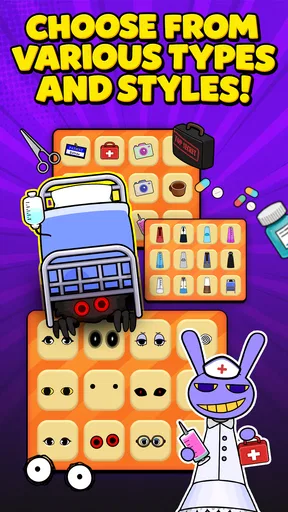
Now, let's dive into the features. One of the standout aspects of Meme Cute Beats is its variety of characters. Each character brings its own unique sound, and the combinations you can create are practically endless. From quirky animal noises to electronic beats, there’s something for everyone.
And let’s not forget about the animations. These aren’t just static icons; they’re lively, meme-inspired characters that dance along to the music you create. It’s a visual and auditory treat that adds a layer of fun to the whole experience.
An added bonus is the ability to share your creations. Once you’ve mastered a beat that you’re particularly proud of, you can easily share it with friends on social media. It’s a fun way to show off your creative side and maybe even start a viral challenge. Who knows? Your next beat could be the next big internet sensation!
Why You'll Keep Coming Back
So, what keeps me coming back to Meme Cute Beats time and time again? It’s the addictive nature of the app. There’s something incredibly satisfying about experimenting with different sounds and watching the characters groove along. It’s a perfect way to kill time while waiting for the bus or during a lunch break.
Plus, the app frequently updates with new characters and sounds, so there’s always something fresh to explore. It’s like a never-ending party in your pocket, and you’re the DJ.
Settings, spending, and version expectations
The game is free to start, with optional in-app purchases priced from $0.99 to $19.99 per item. I would begin without spending: first find out whether the sound-mixing loop holds your attention, then decide if any paid option is genuinely useful to you. That is a better approach than treating a purchase as a shortcut to creativity. The game is made by VGP Studio, and its current version is 0.0.29, so I would keep in mind that the experience may change as it develops rather than assuming every detail is fixed.
On Android, the stated minimum operating system is 8.0. Before installing, I would check that the device meets that requirement and leave enough room for a comfortable session, especially if I tend to keep several apps open. I would also take a moment to look through the game’s own settings and purchase prompts instead of assuming that every control or option works the same way across devices. For a music-focused game, a quiet listening environment and a moderate volume are practical choices: the little differences between layers are easier to judge when they are not competing with background noise.
Small habits that make experiments more useful
Once the basic controls feel familiar, I get more out of the game by treating each session as a tiny test. I start with a simple combination, listen through it, then swap one character or adjust the tempo and compare. That makes it easier to remember which change improved the groove. If I change several things at once, I may still get a funny result, but I cannot tell what made it work.
Another useful habit is to make a deliberately restrained version before building a busier one. A sparse beat lets each sound have room, while adding a layer at a time reveals when the mix starts feeling cluttered. This is a practical way to explore the character sounds without confusing “more” with “better.” It also gives me a clear stopping point: when a new part distracts from the rhythm or joke, I take it back out.
For sharing, I would choose a short, distinctive idea rather than trying to make every session into a showcase. A beat with one memorable sound pairing is often easier for a friend to enjoy than a crowded arrangement. And if I want to revisit a successful idea, I would note the character choices and tempo in my own way before leaving the session, rather than relying on an assumption that the game will preserve every experiment exactly as I expect.
When the limits matter
The game’s light approach is also its main constraint. If I want detailed control over individual sound levels, a broad choice of instruments, or a workflow for finishing and distributing a song, I would choose dedicated music software instead. If I want to be tested on timing and accuracy, a conventional rhythm game is a better match. Meme Cute Beats is most satisfying when I want to arrange amusing sounds and enjoy the visual payoff, not when I need a particular technical result.
It is also not ideal for someone who dislikes character animations or meme-style humor. Those elements are central to its identity, so a player looking for a clean, minimal sound tool may find the presentation distracting. Likewise, anyone who needs dependable, repeatable production controls should try a more specialized option rather than expecting a casual game to behave like a recording studio. I see that as a clear difference in purpose, not a flaw the game needs to hide.
The audience figures suggest that plenty of people have tried it: it has over 1 million installs and a 4.5 average from around 9,500 ratings, while the number of written reviews is much smaller. I treat those figures as a sign of reach and general approval, not a promise that it will suit every taste. Since it is rated Teen, I would also make the age suitability part of the decision rather than choosing it solely because the characters look cute.
Final Thoughts
In a world full of serious apps designed to boost productivity or track your every move, Meme Cute Beats is a breath of fresh air. It’s light-hearted, entertaining, and a fantastic way to unleash your creativity while having a blast. Whether you’re a music enthusiast or just someone who loves a good meme, this app is sure to hit the right note.
So, if you’re looking for a way to add a little rhythm and fun to your day, give Meme Cute Beats a try. Trust me, you won’t regret it. It’s the kind of app that brings a smile to your face, one beat at a time.
My take after weighing the choices
I would recommend it to a friend who likes playful sound combinations, wants something easy to pick up, and is happy for a music game to be more amusing than precise. I would suggest skipping it if the priority is serious composition, note-by-note performance challenges, or a neutral interface without animated characters. That distinction makes the decision straightforward: choose it for a quick creative diversion, not as a replacement for a dedicated music tool.
My practical advice is to start free, keep the first few mixes simple, and judge the game by whether you enjoy returning to experiment—not by whether the first beat sounds polished. If that relaxed loop clicks, it can make an ordinary pause feel more entertaining. If it does not, moving on costs nothing. That is the clearest way I can describe its value: a cheerful, character-driven music game with an easy entry point and a deliberately casual ceiling.
Pros
- User-friendly interface
- easy to navigate.
- Wide range of meme templates available.
- High-quality output with vibrant colors.
- Regular updates with new features.
- Offline mode for creating memes anytime.
Cons
- Contains ads that can interrupt usage.
- Limited free features
- premium required.
- Occasional crashes reported by users.
- Requires internet for template downloads.
- Some features are not intuitive for beginners.
FAQs for Meme Cute Beats
What is Meme Cute Beats and what can I do with it?
Meme Cute Beats is a fun and engaging app that allows users to create and share hilarious meme videos with catchy beats. You can customize your memes using a variety of templates, soundtracks, and effects, making it easy to express your creativity and share laughter with friends and family.
Is Meme Cute Beats available for both Android and iOS devices?
Yes, Meme Cute Beats is available for download on both Android and iOS platforms. You can find it in the Google Play Store for Android devices and the Apple App Store for iOS devices, ensuring compatibility with a wide range of smartphones and tablets.
Are there any in-app purchases or subscriptions required?
Meme Cute Beats offers a free version with basic features, but to access premium templates, soundtracks, and advanced editing tools, users may need to make in-app purchases or subscribe to a premium plan. This allows you to enhance your meme-making experience with exclusive content.
How user-friendly is the Meme Cute Beats interface?
The app is designed with a user-friendly interface that caters to both beginners and experienced meme creators. With intuitive navigation and easy-to-use editing tools, users can quickly create and customize memes without any prior editing experience, making it accessible for everyone.
What are the pros and cons of using Meme Cute Beats?
Pros include a wide variety of templates, catchy soundtracks, and user-friendly editing tools. The app also supports social sharing, making it easy to spread your creations. However, some users might find the in-app purchases necessary to access more advanced features, which could be a downside for those seeking a completely free experience.


